engineering
Meili UI: A Local-First Admin Surface for Meilisearch
A case study in turning repeated search-index maintenance into a focused internal operator tool without overbuilding the deployment boundary.
- #react
- #meilisearch
- #tooling
- #typescript
Problem
Search infrastructure tends to fail in small, awkward ways: an index needs inspection, a document payload looks wrong, a task is stuck, or a setting needs a careful patch. The quickest fix is often a one-off script or a direct SDK snippet, but those fixes do not leave much workflow behind.
Meili UI came from that gap. I wanted a lightweight internal tool for trusted maintenance work against Meilisearch instances, without turning the first version into a full hosted admin platform.
Constraints
The main constraint was scope discipline. A public admin console would need auth, a server-side proxy, shared persistence, audit trails, and a much stronger credential model. That was not the immediate problem.
The useful first version needed to support a trusted operator on a local browser:
- Save multiple Meilisearch instances.
- Reconnect quickly to the last-used instance.
- Inspect indexes, documents, tasks, and per-index settings.
- Keep the credential model honest: browser-local API keys are acceptable only for internal use with scoped keys.
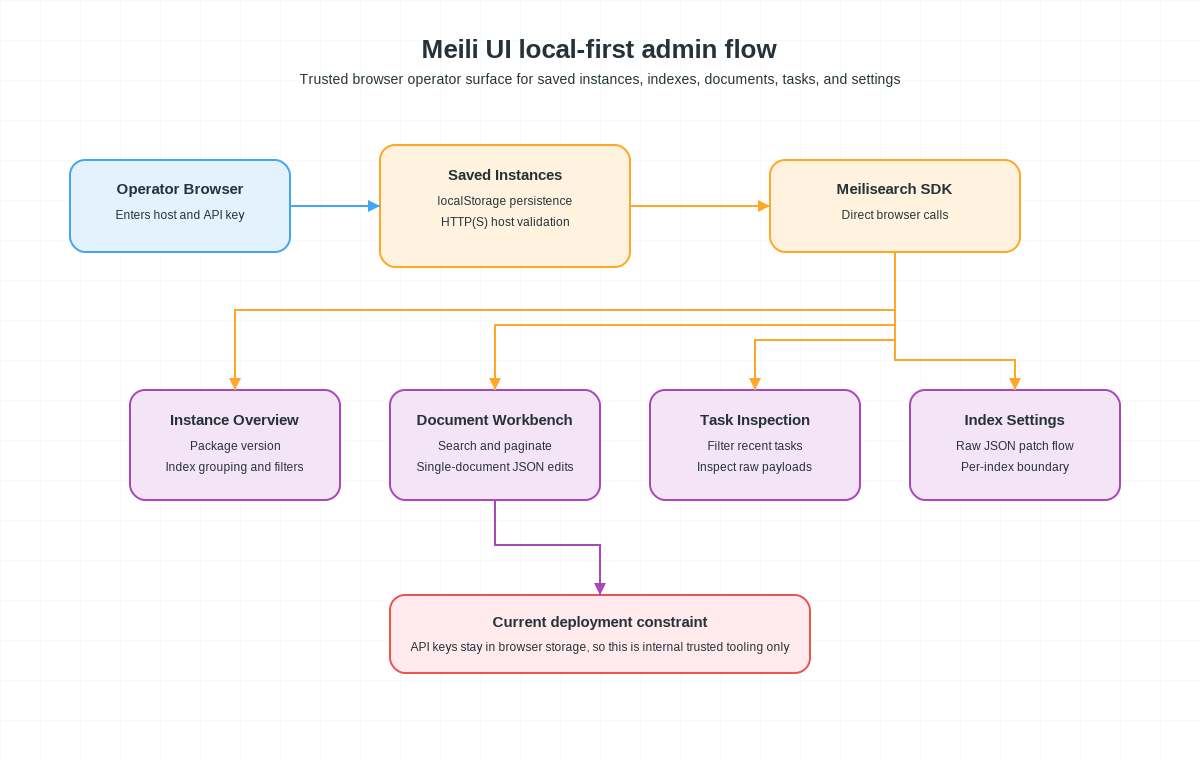
That tradeoff is explicit. Meili UI is not currently a public deployment surface.
Build
The architecture is deliberately small:
src/routes/owns the user workflows: saved-instance landing, instance overview, tasks, documents, and settings.src/lib/meili/owns the durable Meilisearch boundary: storage, API access, index grouping, document helpers, and task reconciliation.src/features/meili/owns interaction components such as saved-instance panels, dialogs, and document viewers.
That split keeps the product behavior out of incidental UI code. The important contract is not a card layout. It is the ability to connect to an instance, understand its indexes, inspect or change a document, debug recent tasks, and patch settings without writing a new script each time.
The route surface reflects that contract:
- The landing page manages saved instances.
- The instance overview checks connectivity, shows package/version data, groups indexes, and supports index creation.
- The documents screen supports search, pagination, raw JSON inspection, and single-document create/edit/delete.
- The tasks screen is inspection-only, with filters and raw payload detail.
- The settings screen patches raw JSON settings for one index at a time.
The most important design choice was restraint. Tasks are not a control plane. Settings are not a full configuration suite. Documents are not a bulk import system. Each screen covers the maintenance job it was built for and stops there.
Result
The result is a usable internal operator surface for Meilisearch maintenance:
- Saved instances with last-used tracking.
- Direct browser SDK calls for fast local operation.
- Index overview and grouping for quick orientation.
- Focused document, task, and settings workflows.
- Tests, typecheck, and production build passing at the latest wiki ingest.
There is still repo hygiene work. The latest ingest recorded repo-wide lint failures in shared primitive/style code, so the honest claim is not "everything is green." The better claim is that the Meili-specific product boundary is useful and validated, while broader lint cleanup remains open.
Lesson
The lesson is that internal tools do not need to start as platforms. A good first version can be narrow, explicit, and useful.
For me, this project shows a practical engineering pattern: remove the repeated manual workflow, keep the domain boundary clean, and state the security limits plainly. The next serious step is not more UI. It is hardening the deployment model with auth, a proxy boundary, scoped credential handling, and a clean lint baseline.
Related posts
Continue with articles that overlap in category or shared tags.
engineering
Paper Trading Bot: Research Stack for Hyperliquid Perps
A case study in separating research, simulation, analytics, dashboarding, and live-risk controls in a Hyperliquid trading system.
Read related postengineering
Enterprise Integration Work Across Retail Operations
A public-safe look at the source-of-truth and workflow boundaries behind enterprise retail systems.
Read related postengineering
RequestLab: A Local-First macOS API Workbench
A native SwiftUI API client built around readable workspace files, testable core logic, and practical release packaging.
Read related post